Applies to: iOS and iPadOS 26 / macOS 26.5 / plain Frigate is enough
Live
On this page
The Live tab shows every camera at once and gets out of the way.
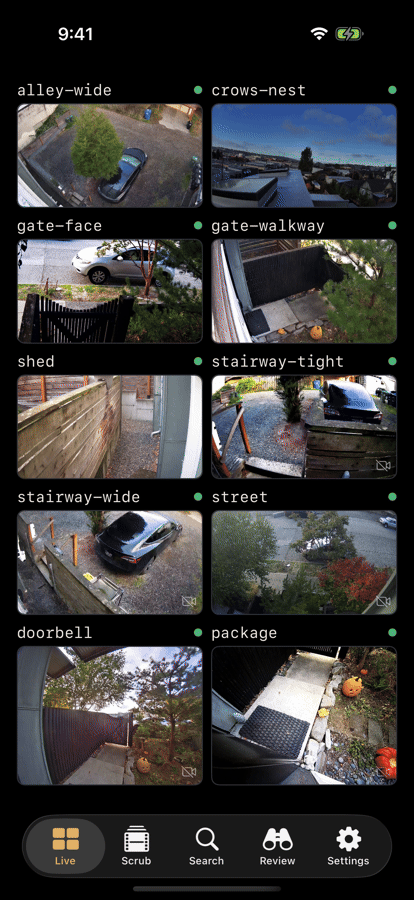
The grid
Each tile carries the camera name, a status dot, and a still that refreshes as the app polls. Tapping a tile opens that camera on the Scrub tab.
When there are encounters you have not seen, one quiet line above the grid says how many ("6 encounters while you were away"); tap it to open the Review tab.
A tile that has gone quiet shows a Stale badge and a yellow dot. A tile whose first frame never arrived shows a grey dot over a camera placeholder. (VoiceOver reads these as "last updated" and "Unavailable".) Those two states are the difference between "the feed stopped" and "the feed never started", which is usually the difference between a camera problem and a network problem. A small crossed-out camera in a tile's corner means that tile is showing a still rather than video, because of the live video tiles limit below.
Not every tile streams live video at once. Settings › Appearance & Display › Live video tiles controls how many do; Auto means four on iPhone and six on iPad. The rest show a still that refreshes every second.
Camera order
By default Elsinore groups cameras by aspect ratio, so the grid does not
stagger, and orders cameras within a group by Frigate's own ui.order.
To take over, go to Settings › Appearance & Display › Camera Order and drag. Each drag is saved immediately; there is no save button. Reset to default puts the automatic grouping back.
Single camera
Tapping a tile opens that camera on the Scrub tab: the live picture at the top, the reel below it, so moving from "what is happening now" to "what happened an hour ago" does not mean changing screens.
Viewing a camera also publishes a Handoff activity carrying the camera name and playback time, so you can pick the same moment up on another Apple device. See Mac.
WebRTC and HLS
On a single camera Elsinore tries WebRTC first, through the go2rtc
component embedded in Frigate, because it is the only way to get live
latency down to something that feels live.
The app waits about three and a half seconds for an actual rendered frame. Not a connected socket, not a completed ICE handshake: a frame on screen. If no frame arrives in that window, it falls back to HLS. Three things cause that:
- Signalling failed: the app could not negotiate with go2rtc at all.
- ICE failed: the two ends could not agree on a network path.
- Media timeout: signalling succeeded over HTTP, but the media itself, which travels on its own port, never arrived. This is the common case on restrictive networks and on reverse proxies that only forward HTTP.
The app also watches for a stream that starts and then starves. If frames stop arriving on a stream that still claims to be playing, it falls back to HLS mid-stream rather than showing you a frozen picture.
What the fallback feels like
HLS is segmented, so it is several seconds behind real time rather than under one. Everything still works; it is just not live in the way WebRTC is live. If your remote setup always falls back, an overlay network usually fixes it where a reverse proxy cannot.
Live on the Scrub page
While you are watching recorded footage the live picture is switched off, so the app is not streaming something you cannot see. Press LIVE and it reconnects, usually in a second or two. If the live picture fails it retries by itself; if it never starts, copy Settings › Server › Connection Doctor › Copy live diagnostics into a bug report.
There is no numeric "seconds behind" readout for live. The signed offset you see on the Scrub reel's LIVE chip is about your position in the recording, not about stream latency.